
eForms 2.0 Is Here: Built on Your Processes, Not Ours
Sign in
✕
  • Platform
    • Platform Overview
    • Project Dashboards
    • Simpel Essentials
    • Quality Management
    • HSE Management
    • Site Access
    • Bookings and Warehousing
    • Reporting and Analytics
  • Client Type
    • REITs & Developers
    • Contractors
    • Subcontractors
    • High Security Projects
  • Module Spotlight
    • Simpel Passport – Profile Management
    • Document Management
    • QR Docs – Scan onsite
    • QTrack – QA Inspections
    • Drawing Collaboration
  • Switch to Simpel
  • Resources
    • Case Studies & News
    • White Papers
    • Blog
  • Careers
  • Support
Simpel_Reversed_Sticky_Header
  • Platform
    • Platform Overview
    • Project Dashboards
    • Simpel Essentials
    • Quality Management
    • HSE Management
    • Site Access
    • Bookings and Warehousing
    • Reporting and Analytics
  • Client Type
    • REITs & Developers
    • Contractors
    • Subcontractors
    • High Security Projects
  • Module Spotlight
    • Simpel Passport – Profile Management
    • Document Management
    • QR Docs – Scan onsite
    • QTrack – QA Inspections
    • Drawing Collaboration
  • Switch to Simpel
  • Resources
    • Case Studies & News
    • White Papers
    • Blog
  • Careers
  • Support
Book a demo
Sign in
✕
  • Platform
    • Platform Overview
    • Project Dashboards
    • Simpel Essentials
    • Quality Management
    • HSE Management
    • Site Access
    • Bookings and Warehousing
    • Reporting and Analytics
  • Client Type
    • REITs & Developers
    • Contractors
    • Subcontractors
    • High Security Projects
  • Module Spotlight
    • Simpel Passport – Profile Management
    • Document Management
    • QR Docs – Scan onsite
    • QTrack – QA Inspections
    • Drawing Collaboration
  • Switch to Simpel
  • Resources
    • Case Studies & News
    • White Papers
    • Blog
  • Careers
  • Support
✕
  • Platform
    • Platform Overview
    • Project Dashboards
    • Simpel Essentials
    • Quality Management
    • HSE Management
    • Site Access
    • Bookings and Warehousing
    • Reporting and Analytics
  • Client Type
    • REITs & Developers
    • Contractors
    • Subcontractors
    • High Security Projects
  • Module Spotlight
    • Simpel Passport – Profile Management
    • Document Management
    • QR Docs – Scan onsite
    • QTrack – QA Inspections
    • Drawing Collaboration
  • Switch to Simpel
  • Resources
    • Case Studies & News
    • White Papers
    • Blog
  • Careers
  • Support
EFORMS, OPERATIONS, DIGITAL TRANSFORMATION

eForms 2.0 is Here: Built On Your Processes, Not Ours

Ebony Middleton | Published on 27 June 2025
Image of a construction worker on a laptop with an overlay of Simpel's new eForm builder

Electronic Forms are the lifeblood of operations every construction project. Tracking every inspection, permit, induction and ITP approval, they touch almost every part of construction operations. Driving action and enforcing accountability, forms sit at the intersection of process, performance, and proof—yet most systems still treat them as static paperwork.

Why paper and PDFs still dominate (and what that tells us)

This is why we still see so many organisations relying on paper or PDFs. These formats offer the flexibility required to build forms that protect processes and collect elaborate requirements. But the right form can still lead to the wrong outcome if the system around it can’t track the full picture, action it easily, workflow and collect data digitally from your supply chain or store it reliably to leverage the data.

When “digital” isn’t really digital

Evidentially, when going digital, there’s no margin for interpretation. If a form says ‘two signatures’, there’s a reason. If an ITP has 27 checkpoints, in a specific order, it’s because the process depends on it. That level of structure can’t be compromised which is why traditional methods are still so popular. However, that flexibility means nothing if you can’t prove a form was filled out correctly or find it when you need it.

What used to be paper is now the pulse of operations

That’s why we took the approach we did when we first built eForms. A fillable PDF or scanning paper and calling it digital was never going to cut it. Instead, we made sure our functionality would improve workflows by adding automation and auditability—while allowing for complete customisation and precise, real-time data capture. They were never an add-on. They’ve always been the operational core of the platform.

Now with eForms 2.0 we’ve doubled down on that philosophy, this release is a step-change. Not just in appearance, but in function. We’ve tightened the link between submission, tasking, and follow-up so that every form becomes a live, trackable workflow. No extra clicks. No extra scrolls. The same powerful foundation just pushed even further.

How Simpel’s Latest Updates Make Every Submission Count

Simpel's update to eForms for construction project management

Simpel’s latest eForm and Task upgrades were built around a clear goal: making daily processes faster, clearer, and more reliable.

This release removes the friction between submission and follow-up, linking forms, tasks, and files in one seamless flow. Key actions are anchored right beside the information triggering them including with conditional logic.

Simpel’s latest eForm and Task upgrades were built around a clear goal: making daily processes faster, clearer, and more reliable.

This release removes the friction between submission and follow-up, linking forms, tasks, and files in one seamless flow. Key actions are anchored right beside the information triggering them including with conditional logic.

Take ITPs, for example. They’re complex, task-heavy forms that can have 20-30 steps and approvals or upwards of 50-200+ on complex builds. With inline tasking and attachments, each action now sits alongside its relevant checkbox, with all documentation connected as well.

While others are busy handing forms over to AI, we’ve focused on what teams actually need: visibility, control, and tools that hold up under real-world conditions.

Let’s take a closer look at what’s new.
Simpel's update to eForms for construction project management

How Simpel’s Latest Updates Make Every Submission Count

Simpel’s latest eForm and Task upgrades were built around a clear goal: making daily processes faster, clearer, and more reliable.

This release removes the friction between submission and follow-up, linking forms, tasks, and files in one seamless flow. Key actions are anchored right beside the information triggering them including with conditional logic.

Simpel’s latest eForm and Task upgrades were built around a clear goal: making daily processes faster, clearer, and more reliable.

This release removes the friction between submission and follow-up, linking forms, tasks, and files in one seamless flow. Key actions are anchored right beside the information triggering them including with conditional logic.

Take ITPs, for example. They’re complex, task-heavy forms that can have 20-30 steps and approvals or upwards of 50-200+ on complex builds. With inline tasking and attachments, each action now sits alongside its relevant checkbox, with all documentation connected as well.

While others are busy handing forms over to AI, we’ve focused on what teams actually need: visibility, control, and tools that hold up under real-world conditions.

Let’s take a closer look at what’s new.

How Simpel’s Latest Updates Make Every Submission Count

Simpel’s latest eForm and Task upgrades were built around a clear goal: making daily processes faster, clearer, and more reliable.

This release removes the friction between submission and follow-up, linking forms, tasks, and files in one seamless flow. Key actions are anchored right beside the information triggering them including with conditional logic.

Simpel's update to eForms for construction project management

Simpel’s latest eForm and Task upgrades were built around a clear goal: making daily processes faster, clearer, and more reliable.

This release removes the friction between submission and follow-up, linking forms, tasks, and files in one seamless flow. Key actions are anchored right beside the information triggering them including with conditional logic.

Take ITPs, for example. They’re complex, task-heavy forms that can have 20-30 steps and approvals or upwards of 50-200+ on complex builds. With inline tasking and attachments, each action now sits alongside its relevant checkbox, with all documentation connected as well.

While others are busy handing forms over to AI, we’ve focused on what teams actually need: visibility, control, and tools that hold up under real-world conditions.

Let’s take a closer look at what’s new.

Connect tasks to the context creating them

Forms have always captured data. Now they drive the next step, right from the source.

Inline Tasks

Click to expand

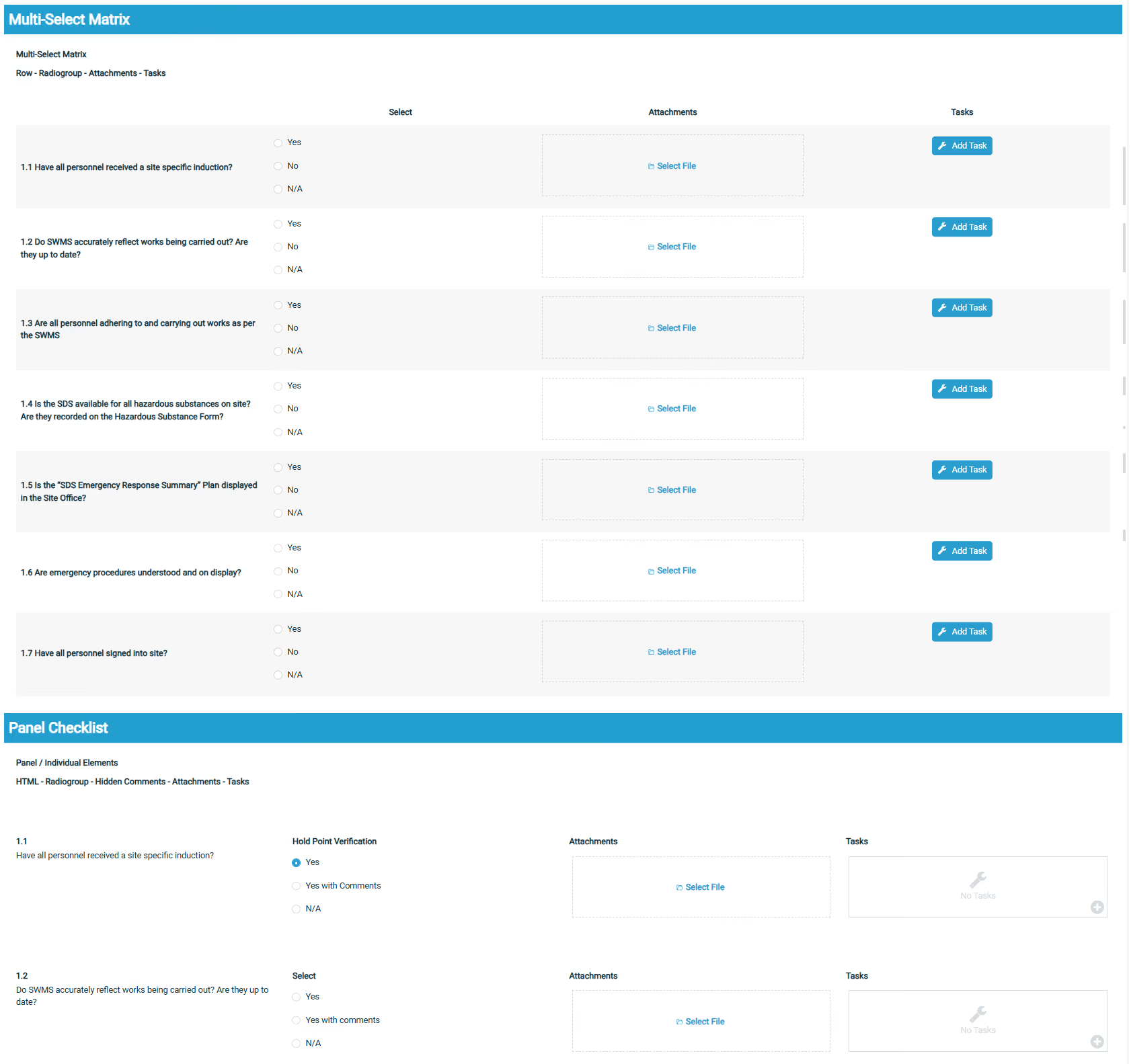
Multiple tasks and evidence can now be raised directly from a form response based on logic-based selections, ensuring your team doesn't have to interpret where actions or further investigations are needed. No extra clicks, no retyping. Whether it’s one task or a batch, the link between response and action stays fixed.

  • Connect tasks to individual questions: Raise tasks exactly where they’re needed, based on response and right on the question. Set them to trigger automatically based on answers or assign them in bulk if the form calls for it.
  • Find next actions quickly: Colour coding makes it easy to spot what needs doing. Green means go. Subbies instantly see where their tasks originated and what they relate to.
  • Maintain audit-ready records: Tasks and forms can be permanently intertwined for no fuss auditability during and after the process.
Connect tasks to the context creating them

Forms have always captured data. Now they drive the next step, right from the source.

Inline Tasks

Multiple tasks and evidence can now be raised directly from a form response based on logic-based selections, ensuring your team doesn't have to interpret where actions or further investigations are needed. No extra clicks, no retyping. Whether it’s one task or a batch, the link between response and action stays fixed.

  • Connect tasks to individual questions: Raise tasks exactly where they’re needed, based on response and right on the question. Set them to trigger automatically based on answers or assign them in bulk if the form calls for it.

Click to expand

  • Find next actions quickly: Colour coding makes it easy to spot what needs doing. Green means go. Subbies instantly see where their tasks originated and what they relate to.
  • Maintain audit-ready records: Tasks and forms can be permanently intertwined for no fuss auditability during and after the process.

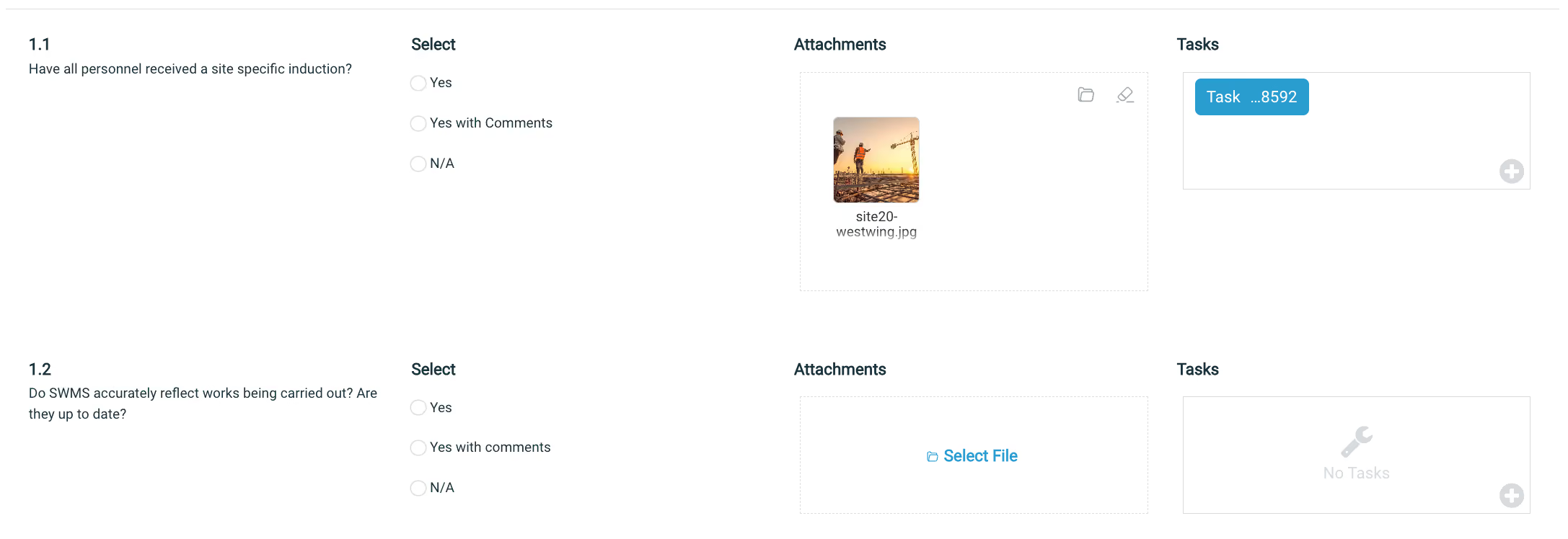
Inline Attachments

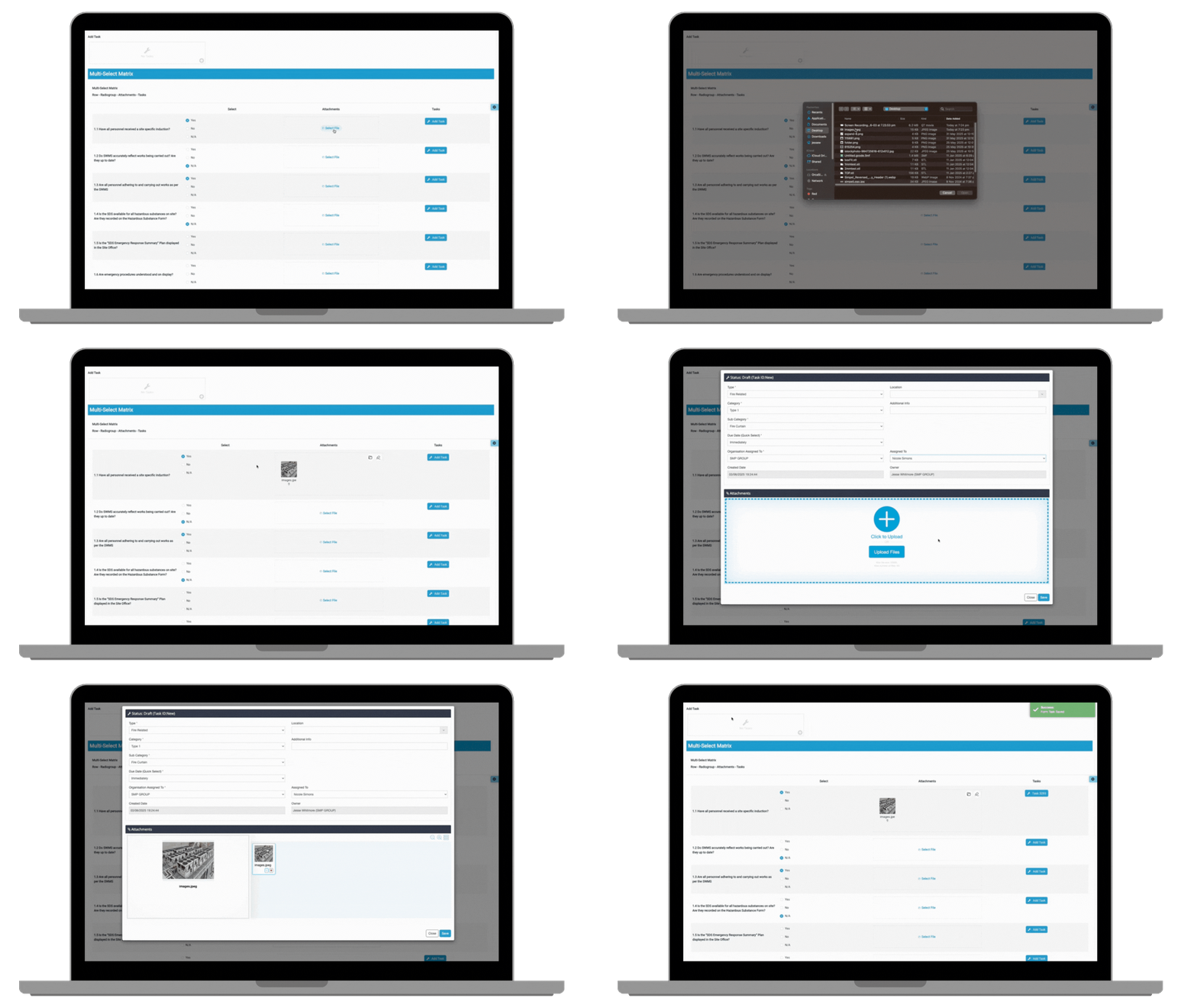
Evidence and files can now be added or enforced where they’re needed against the relevant question. Drag and drop up to 50 files at a time, in any format, with built-in previews to check everything’s where it should be.

  • Attach files to specific questions: Add drawings, photos, files etc, directly to the relevant form subsection they support. Reviewers get all the information they need without prompting or searching.
  • Preview within the window: Click once to view files in full. Scroll through attachments in sequence and add comments all in one spot.
  • Keep records locked and complete: Once submitted, files are locked in place and included in exports alongside the form. Nothing gets separated or lost in the process.
Click to expand

Inline Attachments

Evidence and files can now be added or enforced where they’re needed against the relevant question. Drag and drop up to 50 files at a time, in any format, with built-in previews to check everything’s where it should be.

  • Attach files to specific questions: Add drawings, photos, files etc, directly to the relevant form subsection they support. Reviewers get all the information they need without prompting or searching.
  • Preview within the window: Click once to view files in full. Scroll through attachments in sequence and add comments all in one spot.
  • Keep records locked and complete: Once submitted, files are locked in place and included in exports alongside the form. Nothing gets separated or lost in the process.

Click to expand

From setup to rollout, form building just got easier

Whether you’re managing dozens of forms across multiple projects or refining a single workflow, Simpel’s latest updates give you more control without adding complexity. The new form index, editing tools and layout improvements make it easier to see what’s live, make changes quickly and keep everything aligned.

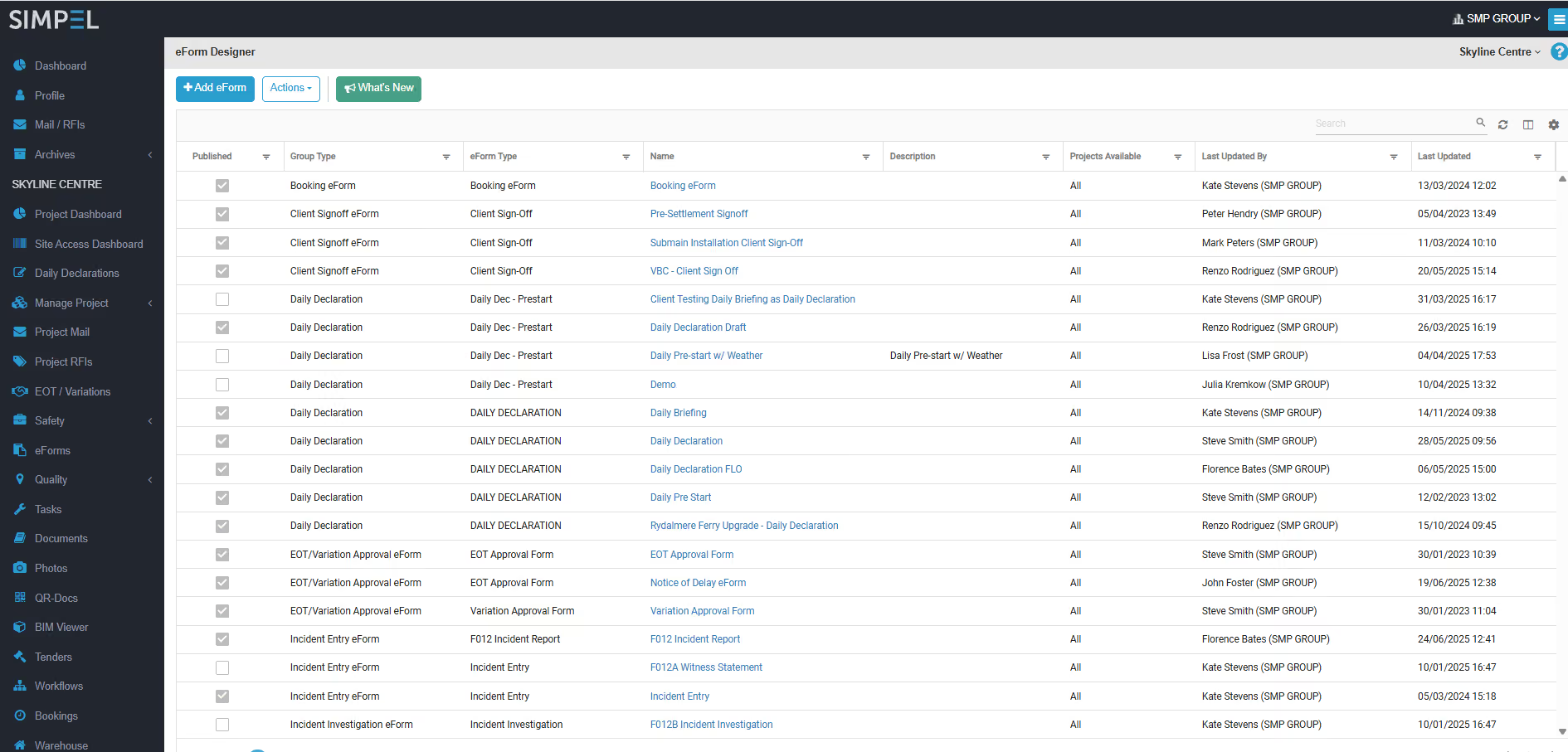
New index page features

Screenshot of Simpel's eForms Index Page showing the new audit path

Click to expand

  • See what’s active in seconds: A new ‘Published’ column shows if forms are active or in draft, so you can track usage without opening them one by one.
  • Check where they’re used instantly: The Projects Available field shows exactly which projects each form is linked to. It helps you catch things like a site-specific form appearing on multiple jobs, so you can make adjustments and keep everything aligned.
  • Export forms with context intact: Download the entire packet to Excel with filters applied. This can be used to audit usage, review coverage, and plan updates across projects.
  • Audit trail: Clearly see who on your team created or modified each form version, with the ability to revert changes when needed. Strict security roles ensure only authorised users can make updates—keeping your form library compliant and under control.
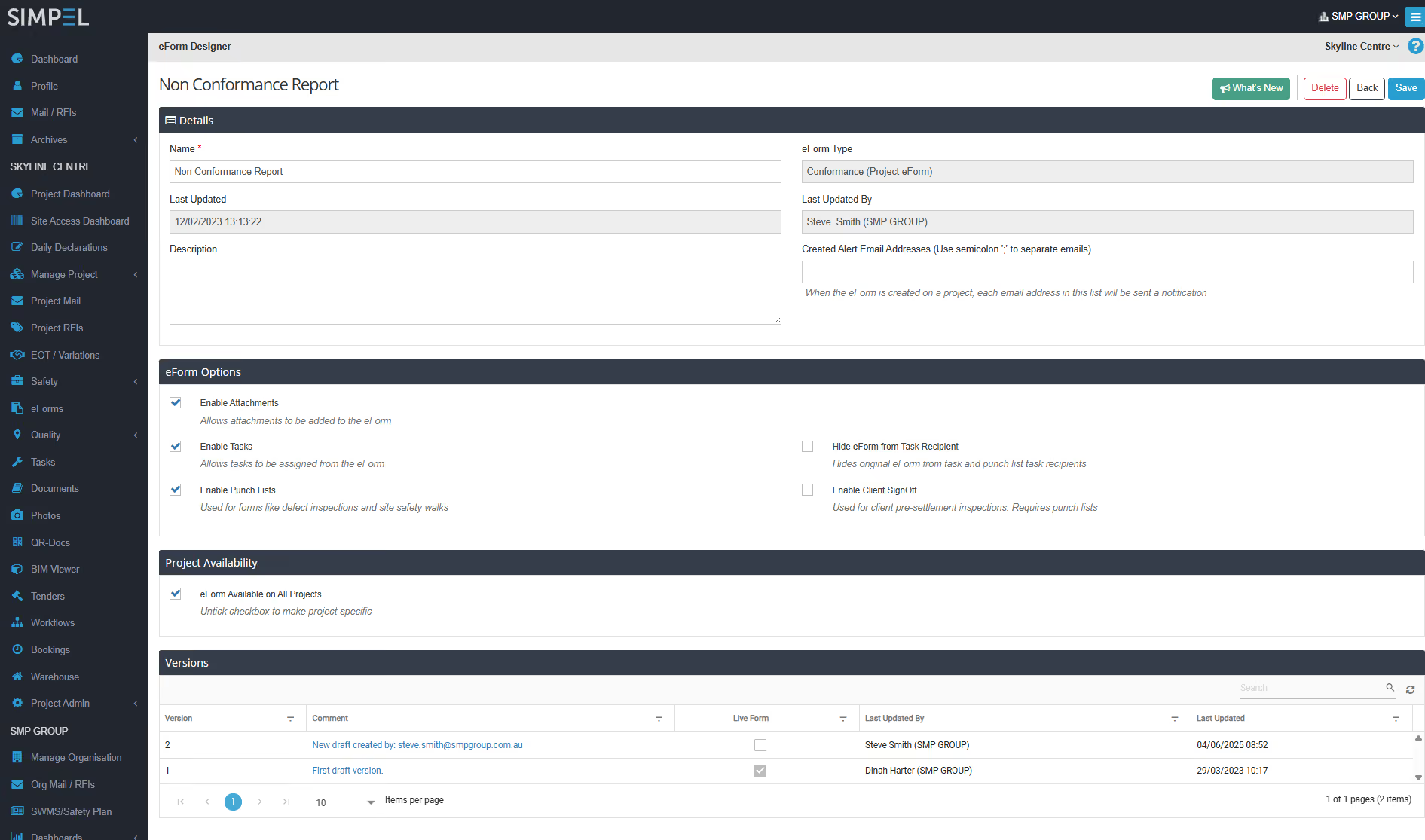
Better form versioning and layout

Click to expand

  • Cleaner, easy to skim forms: The updated layout improves how forms are displayed and filled out, making them quicker to scan and simpler to work with.
  • See what’s live before you click save: Distinctive labels and alerts show exactly which version is active, so edits don’t get applied to the live (or wrong) form.
  • Publish updates more easily: The updated publishing flow is cleaner and more intuitive, so it’s faster and easier to deploy than ever.
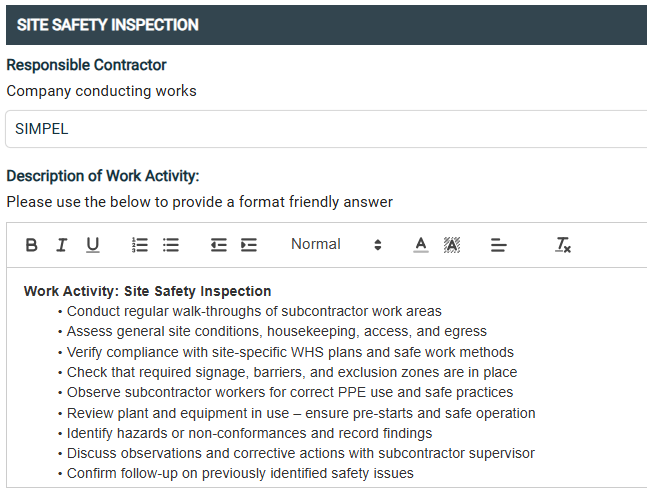
Richer form tools

  • Enable rich text responses: Let users answer with the formatting experience they’d expect in an email including bold text, bullet points, line breaks and more.
  • Add guidance with explainer text: Add extra context, examples or instructions using a visual editor. No HTML required.
  • Improved JSON handling: Import, export, download and copy form configurations with improved JSON handling that keeps setup quick and consistent.
  • eForms that fit how you work: New question types and behind-the-scenes upgrades give you more flexibility to create forms that suit your processes and project needs.
From setup to rollout, form building just got easier

Whether you’re managing dozens of forms across multiple projects or refining a single workflow, Simpel’s latest updates give you more control without adding complexity. The new form index, editing tools and layout improvements make it easier to see what’s live, make changes quickly and keep everything aligned.

New index page features

  • See what’s active in seconds: A new ‘Published’ column shows if forms are active or in draft, so you can track usage without opening them one by one.
  • Check where they’re used instantly: The Projects Available field shows exactly which projects each form is linked to. It helps you catch things like a site-specific form appearing on multiple jobs, so you can make adjustments and keep everything aligned.
Screenshot of Simpel's eForms Index Page showing the new audit path

Click to expand

  • Export forms with context intact: Download the entire packet to Excel with filters applied. This can be used to audit usage, review coverage, and plan updates across projects.
  • Audit trail: Clearly see who on your team created or modified each form version, with the ability to revert changes when needed. Strict security roles ensure only authorised users can make updates—keeping your form library compliant and under control.

Better form versioning and layout

  • Cleaner, easy to skim forms: The updated layout improves how forms are displayed and filled out, making them quicker to scan and simpler to work with.
  • See what’s live before you click save: Distinctive labels and alerts show exactly which version is active, so edits don’t get applied to the live (or wrong) form.
  • Publish updates more easily: The updated publishing flow is cleaner and more intuitive, so it’s faster and easier to deploy than ever.

Click to expand

Richer form tools

  • Enable rich text responses: Let users answer with the formatting experience they’d expect in an email including bold text, bullet points, line breaks and more.
  • Add guidance with explainer text: Add extra context, examples or instructions using a visual editor. No HTML required.
  • Improved JSON handling: Import, export, download and copy form configurations with improved JSON handling that keeps setup quick and consistent.
  • eForms that fit how you work: New question types and behind-the-scenes upgrades give you more flexibility to create forms that suit your processes and project needs.

Click to expand

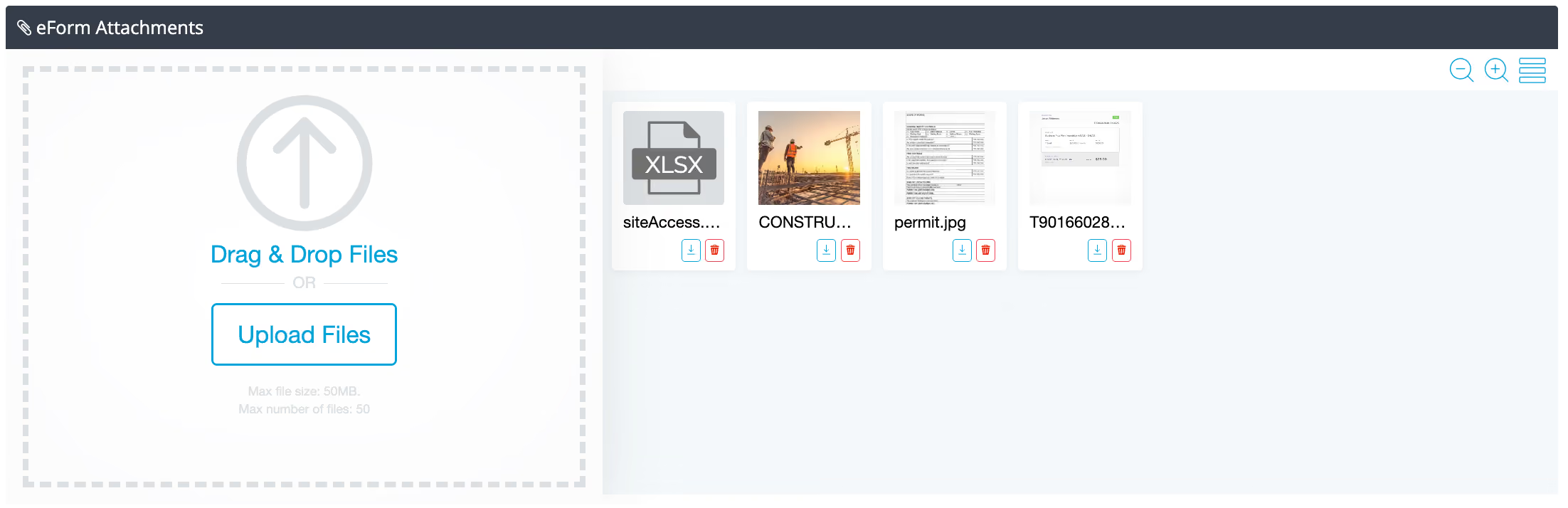
Uploads that are easier to manage and faster to review

Uploading files is now faster, more flexible, and far more user-friendly.

Drag and drop multiple files
Preview PDFs, images and even videos
Choose card or list view to see uploads at a glance
Open uploads in a full-screen gallery, with commenting and in-platform playback

And yes—it’s now live inside both eForms and Tasks.
Uploads that are easier to manage and faster to review

Uploading files is now faster, more flexible, and far more user-friendly.

Drag and drop multiple files
Preview PDFs, images and even videos
Choose card or list view to see uploads at a glance
Open uploads in a full-screen gallery, with commenting and in-platform playback

And yes—it’s now live inside both eForms and Tasks.

Digital workflows that do more (and demand less)

If you’re already using Simpel’s eForm or Task modules, these features are available now. Want help setting them up or seeing what’s possible? Contact your Simpel Client Success Manager or visit our Help Centre for a walkthrough.

If you’re not yet using eForms and tasks, get in contact to see why you should be!

Contact us for a demo

Sign up to Simpel's Newsletter

A quick read with our latest news, blogs, recent software releases, and big company updates

Related news and articles

24 March 2026
Two construction workers in high-visibility vests and hard hats on an active construction site, one pointing out a hazard while the other logs it on a smartphone, demonstrating real-time HSE observation and construction site safety practices.

Ahead of Hazards: How HSE Observations and Actions Keep Construction Site Safety on Track

18 February 2026
Construction worker using an angle grinder to cut steel rebar with sparks flying at a job site, illustrating factors that can impact overall construction permit cost.

Construction Permits Cost More Than You Think: The Business Case for Digitising

26 November 2025
Tablet showing Simpel's Project Compliance Dashboard's being used on site by a contractor

Closing the Loop on Construction Compliance with Daily, Real-Time Controls

30 September 2025
Simpel's proprietary site access turnstile installed and being utilised for construction site security

Fortifying Compliance: Next-Gen Site Security for Construction

16 September 2025
Three construction workers in a site office looking at a disorganised whiteboard

Ditching the Whiteboard: How Construction Scheduling Software Sets the Rhythm of Operations

9 September 2025
Construction worker in high vis using a tablet with a concrete pre-our ITP on Simpel overlay

Move Fast, Stay Compliant: Modernising ITP Construction Processes

26 August 2025
Workers onsite in yellow high-vis completing construction site inductions on their phones

Construction Site Inductions? Sorted. 8 Reasons to Go Digital

22 July 2025
Construction worker using Simpel's Construction program Management SOftware on a tablet while walking through a busy construction site

5 Reasons Why Unified Construction Software is Replacing Disconnected Point Solutions

Share
Simpel Construction software

One operational platform for the construction industry
Designed for construction projects of all types, stages and sizes; Simpel is driving digital transformation and delivering a new era in construction technology

ABN 27 624 797 539
© 2026 Project Simpel Pty Ltd

  • LinkedIn
  • Facebook
  • Instagram

PLATFORM
Platform Overview
Simpel Essentials
Quality Management
HSE Management
Site Access
Bookings & Warehousing
Reporting & Analytics

CLIENT TYPE
REITS & Developers
Contractors
Subcontractors

SALES & CORPORATE ENQUIRIES
+61 2 9222 4222
[email protected]

NATIONAL HELP DESK
1300 85 85 80
[email protected]

SUPPORT
Login to Simpel
Reset your password
Create a new user account
Privacy & Data Protection
Vulnerability Disclosure
SMS Sender ID Register

OFFICE LOCATIONS
NSW
Level 2, 44 Pitt Street
SYDNEY NSW 2000
ACT
Suite 3.02, 33 Allara Street
CANBERRA ACT 2601
WA
Dexus Place
Level 16, 240 St Georges Terrace
PERTH WA 6000
LONDON
Scott House
Suite 1 The Concourse
Waterloo Station
LONDON, SE1 7LY