Closing the Loop on Construction Compliance with Daily, Real-Time Controls
Clear it today or count it non-compliant. Construction compliance demands same-day action and software ensures organisations can close the loop quickly by tracking task owners, status, and proof in one place.
On any given day, a contractor can scan onto site with expired insurance. They may have missed the notification, forgotten to upload, or just decided it was a task for another day. Either way, the lapse in coverage exists the second they step onsite. When that information sits in paper files or isolated apps, it’s impossible to identify and correct as it happens. That’s not a risk of non-compliance, it is non-compliance. And rectification matters most in that moment, not at months end when someone compiles the report.
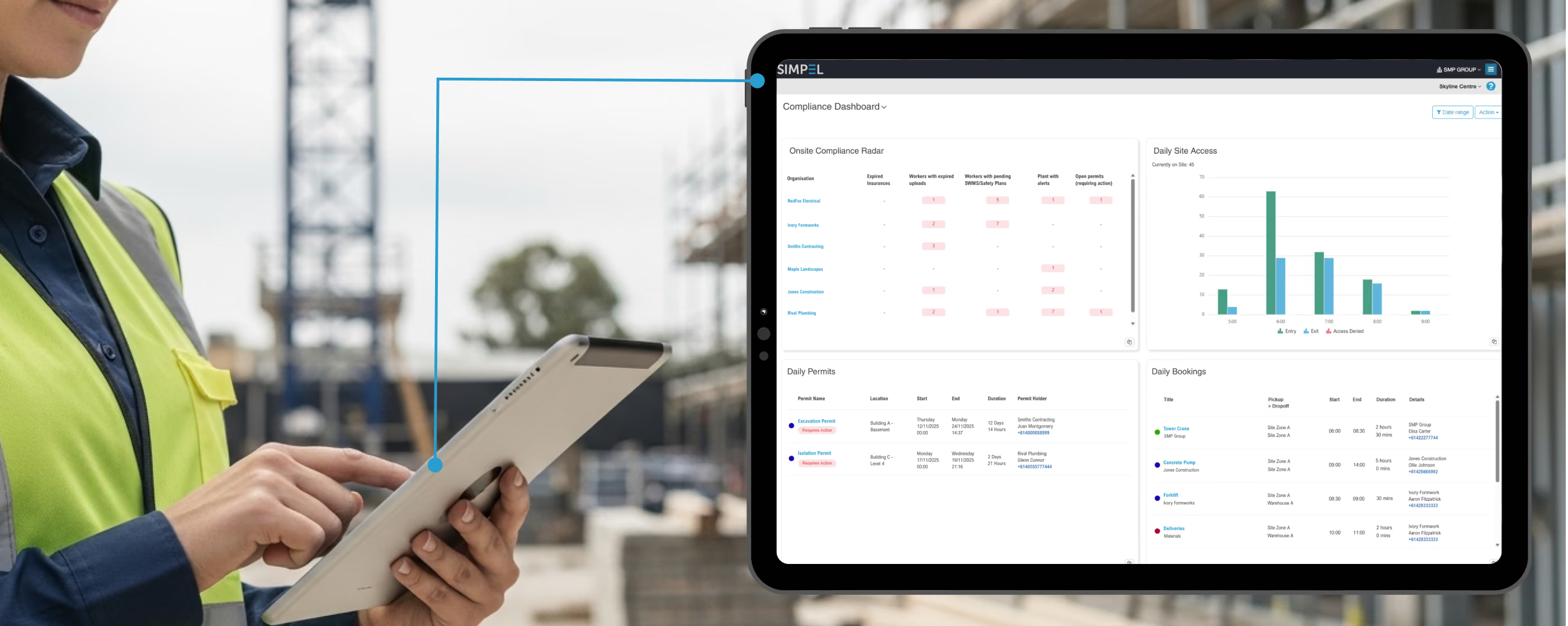
Unify operational data and the day runs differently. Daily compliance dashboards make months end data available every second of every day. Real-time data feeds into one place, surfacing a shortlist of corrective priorities: organisations with expired cover, workers with expired uploads, permits, or SWMS that need attention. Open the item from the card, drill down, action the next step, and close the loop instantly. Every action leaves a tamper-proof record, turning every update into proof that can be relied on come audit time.
What a daily construction compliance dashboard delivers
Measurable improvements in oversight
Oversight becomes clearer and faster, improving resolution speed and strengthening subcontractor accountability. Supervisors see live, site-specific insights at the point of access and can act immediately when a gap appears.
A unified, ‘High-Vis’ data trail
A ‘high-vis’ data trail develops, automatically accumulating evidence as work progresses to produce a definitive, auditable record across the project lifecycle. Time-stamped actions remove documentation gaps and support full regulatory transparency from day one to handover.
Faster resolution times
Issues move from detection to action in minutes. Site teams identify problems in real-time, notify the right people, and pause work until requirements are met, reducing exposure to risk and keeping delivery responsive.
A stronger safety culture and shared responsibility
Safety becomes more transparent and accountable when the system automatically surfaces who is compliant, what remains outstanding, and where immediate action is required. With clearer conversations about safety and stronger alignment on expectations, teams shift toward proactive intervention, address risks earlier, and sustain consistent standards across the site.
Non-negotiable feature checklist for dashboards
Think of dashboards as fifty emails and hallway check-ins collapsed into one live screen that confirms who is on site, what changed, and what is already verified. You only get nudged when a status flips or something is due today, with routine updates bundled into a single daily summary. But not all dashboards are built the same. To deliver optimum value, there are some non-negotiable features to look out for:
- Live Updates: Cards/widgets update the moment data is entered with no manual consolidation
- Date Range Control: Select any time window from project inception to today without rebuilding charts
- Traffic Light View: Green/amber/red colour coding to make priorities obvious at a glance
- Drill Down, Act Fast: Ability to click through from a card to the details and complete the next step without switching systems
- Print & Share: Export a comprehensive, branded report in seconds for management or audits
- Flexible Widget Library: Add, remove, and reorder cards to keep the board focused
- Proof by Default: Every action writes a time-stamped record that supports construction compliance
Critical views that power daily construction compliance on SIMPEL
Compliance Radar: Know exactly who’s onsite and whether they’re compliant
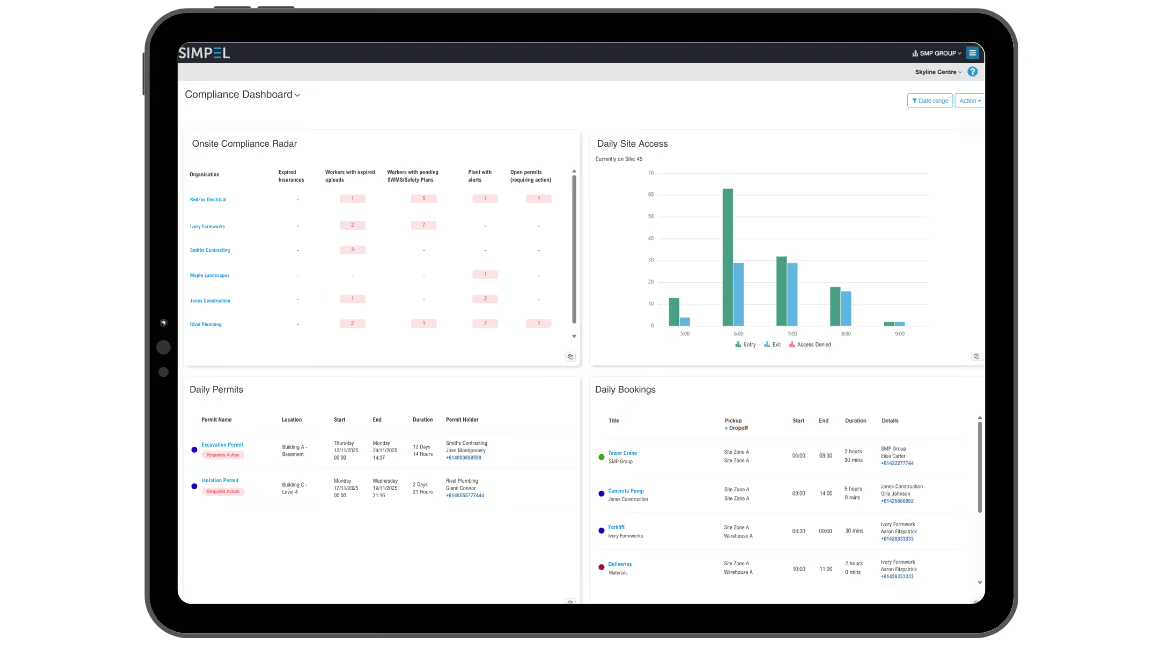
It’s not enough to know 60 SWMS are pending; you need to know if any of them are connected to the workers onsite right now. SIMPEL’s Compliance Radar widget pairs site access scans with live checks of insurance, licences, SWMS sign-offs, plant registrations, and permits, highlighting non-compliant workers who need immediate attention.
Teams simply check the widget as workers arrive; if issues arise, they request uploads, collect sign-offs, or stand down work until corrected. The result is fewer blind spots, faster close-out, and work carried out under the right conditions.
Daily Site Access: Accurate headcount, live movements
Throughout the day, crews rotate, subcontractors step out on breaks, and visitors make their rounds. With constant movement, you need to know who is actually onsite if something goes wrong. Whether it’s a QR poster or a turnstile, the Daily Site Access widget shows a live picture of activity at any moment: current onsite total, entries, exits, and denied entry attempts. Every event is tied to a person and company, so supervisors can verify who is present and export an accurate attendance log.
Daily Permits: What’s live, who’s responsible, what’s next?
The safest call is the informed one and making that happen relies on today’s permits being visible and up to date. The Daily Permits widget lists every permit live today with its location, start/end/duration, and who’s in charge at a glance.
If a permit is nearing expiry or completion, it’s flagged, so supervisors can chase sign-ons, record monitoring notes, or close out on time with the click of a button. Each step adds time-stamped evidence to the permit record, tightening control of high-risk activities and supporting construction compliance.
Daily Bookings: Whiteboard view, without the smudges
The site deliveries whiteboard has gone digital, so everyone works from the same live plan. The Daily Bookings view lists each booking with its title, pick-up and drop-off locations, start and end time, duration, and any key details, giving the gate, warehouse, and site teams a single plan for plant arrivals, removals, and material drops. By aligning movements with approved access points, routes, and any required permits, it helps prevent clashes and keeps traffic under control on site.
Overdue by Status and Organisation: From open tasks to closed loops
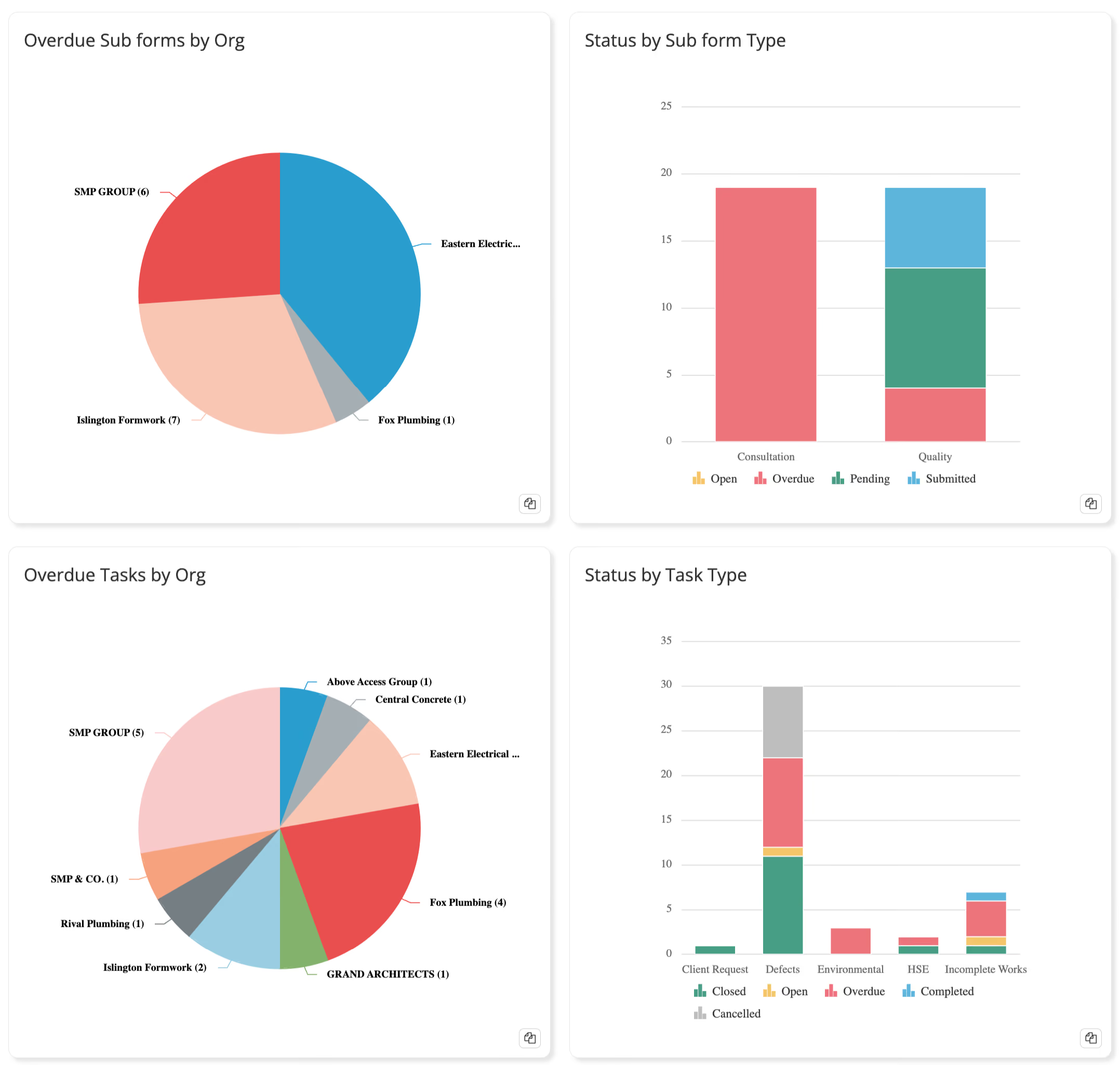
The path to faster close-outs begins with clarity on who’s responsible for what tasks. Overdue by status and organisation charts highlight which organisations are carrying the bulk of overdue work. Whether it’s unsubmitted ITPs, consultation forms, or unresolved tasks, the breakdown by organisation makes it clear who needs to act. Instead of combing through a project-wide backlog, teams can go straight to the source, escalate if needed, and make sure the right responsibilities are being closed out.
Status by Subform and Task Types: Prioritise the real risks
Here the focus shifts from who is responsible to what is outstanding. Subforms and tasks are categorised into types like ITPs, consultations, safety tasks, defects, and colour-coded by status. This view shows at a glance whether the problem is volume, timeliness, or). By surfacing the exact categories under pressure, managers can prioritise the riskiest gaps and drive completion before they escalate into audit issues or delivery delays.
In all my time in the industry, I’ve never seen an OFSC audit come back with zero CARs (Corrective Action Reports). Having all the documentation available at our fingertips made a huge difference and the auditor couldn’t find fault with our systems or procedures. The team clearly implemented the system well. - Nathan Austin, General Manager, Form
Turning daily data into construction compliance
With SIMPEL, daily oversight becomes a workflow you can trust: real head counts tied to access events, critical views that spotlight what needs attention now, and a feature set that turns every click into evidence. The result is fewer surprises, faster closeout of actions, and stronger Construction Compliance backed by a single, reliable source of truth across people, plant, and process.
Book a demo to see how SIMPEL's dashboards help you spot risks sooner and close them out faster.
Frequently Asked Questions
What is a compliance dashboard?
A compliance project dashboard is a live view of daily data that shows where requirements have been met and where action is still needed. It gives supervisors and quality teams live visibility, helping them identify and resolve gaps before they become non-compliant.
What are the key features of a construction compliance dashboard?
Essential features of any project dashboard include data updates, time-stamped activity records, traffic light indicators, and drill-down access to supporting documentation. Together, these allow teams to monitor progress, track accountability, and close out items quickly.
Why is real-time data important for closing the compliance loop?
Real-time data keeps compliance actions aligned with the current state of the project. When information updates instantly, teams can identify lapses as they occur, resolve them quickly, and maintain an uninterrupted record of compliance throughout the day.
What types of compliance data should be tracked daily?
Key daily data includes worker credentials, SWMS, insurance cover, permits, safety documents, and organisation-level performance. Tracking these continuously ensures oversight remains current and that risks are managed proactively.

Sign up to Simpel's Newsletter
A quick read with our latest news, blogs, recent software releases, and big company updates